How to Resolve iPhone Speaker Problem 2019
Many of the iPhone users have complaints about the iPhone speaker problem. You call someone and are not capable of listening anything from the other side on the phone. You may feel dissatisfied at this instant and plan to walk towards nearest repair store to get the problem fixed by the professionals. But hang on! Don’t jump to the conclusion that your iPhone may be having some hardware malfunction. Sometimes it seems not true. The speaker issue can be a result of software malfunction as well. Therefore, with no more stress, read on and find some simple tips for iPhone’s no sound problem.
Tip 1. Check Sound Settings
1. Ring/Silent Switch Check
Sometimes you may have unknowingly turned the Ring/Silent Switch on the exterior of your iPhone to silent mode. If you see an orange near that switch, your iPhone is definitely set on silent mode. Make sure you have turned it to Ringer Mode by pulling it to the front side of your iPhone.

2. Volume Check
Other possible reason could be that the volume may have been lowered and you forgot to raise it back again. Adjust the volume with volume buttons. If this doesn’t work, head to “Settings”, proceed to “Sounds”. Now, to turn up the volume, you have to drag the Ringer and Alerts slider.
Tip 2. Force Reboot Check
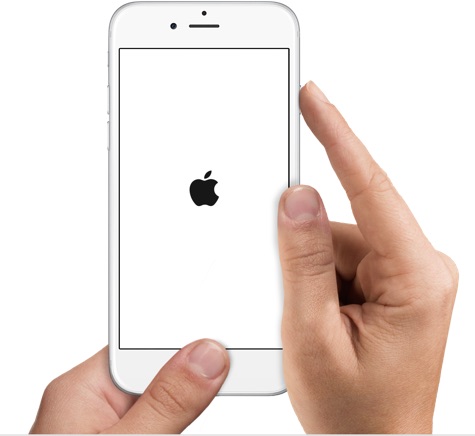
Try to restart your iPhone. A temporary or minor glitch could have been troubling you. Restarting your device will get this glitch eliminated. You need to hold the “power button” and “home button” for no more than 10 seconds.
Tip 3. Bluetooth Check
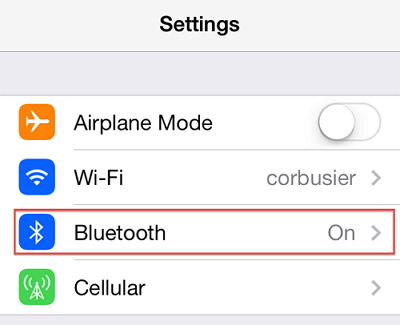
There could be a possibility that your iPhone is connected to a Bluetooth and playing sound through that. Turn off the Bluetooth from the Settings and check again for the sound.
Tip 4. Connect Headset to Check
Test the sound of your iPhone with a headset. Plug in your headset into your iPhone and check if through the headset, you can hear the sound or not. Sometimes due to the presence of the dust, dirt or grime, the connectors may work badly and your iPhone may think the headset is still pluged in. This situation is iPhone gets stuck in headphone mode so that you can not hear the sound without headset. Hence, you need to clear out dirt, grime or dust from the headset port to resolve the issue.If you lost data after you updated to a new iPhone, you can always use Gihosoft iPhone Data Recovery to get the data back from the old iPhone or backup.You may also like: iphonerecovery.com
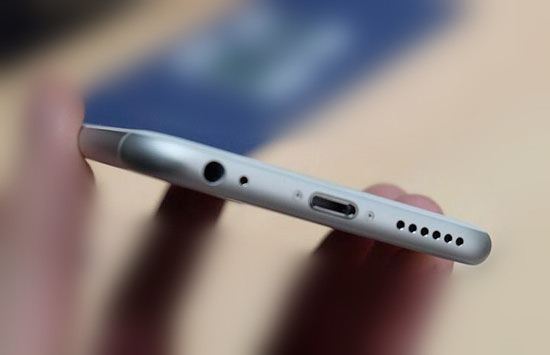
Take a brush and clean the docking area where you plug in your headset. Remember to do this gently! You can also use alcohol or methylated spirits or acetone as they will aid in removing off extra dirt and on a plus, these chemicals get evaporated and will, in turn, not do any harm to the connectors.
Tip 5. Solve iPhone Speaker Problem Using Third-party Tool
Sometimes, iPhone no sound problem can also be caused by system issue. You can settle this issue without losing your data. This can be done with the help of iMyFone iOS System Recovery, a remarkable software that empowers you to repair your iOS device.Sponsor ads:
Gihosoft Free iPhone Data Recovery:https://www.gihosoft.com/iphone-data-recovery-free.html
Gihosoft iPhone Data Recovery Free
Free iPhone Data Recovery Software for Windows/Mac
Recover up to 12+ types of files, including contacts, SMS, photos, WhatsApp, Viber, notes, etc.
Restore lost data from iOS devices directly or from iTunes and iCloud backup
Recover iPhone data lost due to iOS upgrade/jailbreak, accidental deletion, device lost or broken Note Tips: Top 3 Alternative Sites to TamilDbox 2019
Also Read:8
Best Chess Apps for iPhone & iPad 2019
Support all the latest iPhone, iPad and iPod Touch
Both Free and Pro version.
If you lost data after you updated to a new iPhone, you can always use Gihosoft iPhone Data Recovery to get the data back from the old iPhone or backup.You may also like: iphonerecovery.com
If you use android phones, please choose Gihosoft Android Data Recovery.
With Gihosoft Android Data Recovery, no longer afraid of data loss!
Must read:Youtube video downloader for pc
Gihosoft RePicvid Free Photo Recovery Software provides a free photo recovery software for windows to help users recover the deleted or lost photo for free.
Jihosoft Android Data Recovery: the best Android Data Recovery software for Windows and Mac to recover deleted contacts, messages, photos, videos, WhatsApp and etc from Android devices.Tips:How to transfer messages from iPhone to iPhone
jihosoft Free iPhone Data Recovery

Kommentit
Lähetä kommentti